Beta waitlist now open

Everything packed. Nobody arguing in the woods.

TripList builds your packing list from where you're going and who's coming, keeps track of every piece of gear you own, and lets the whole family pack it together from their own phones at the same time.

We're letting families in a few at a time. Free while we're in beta.

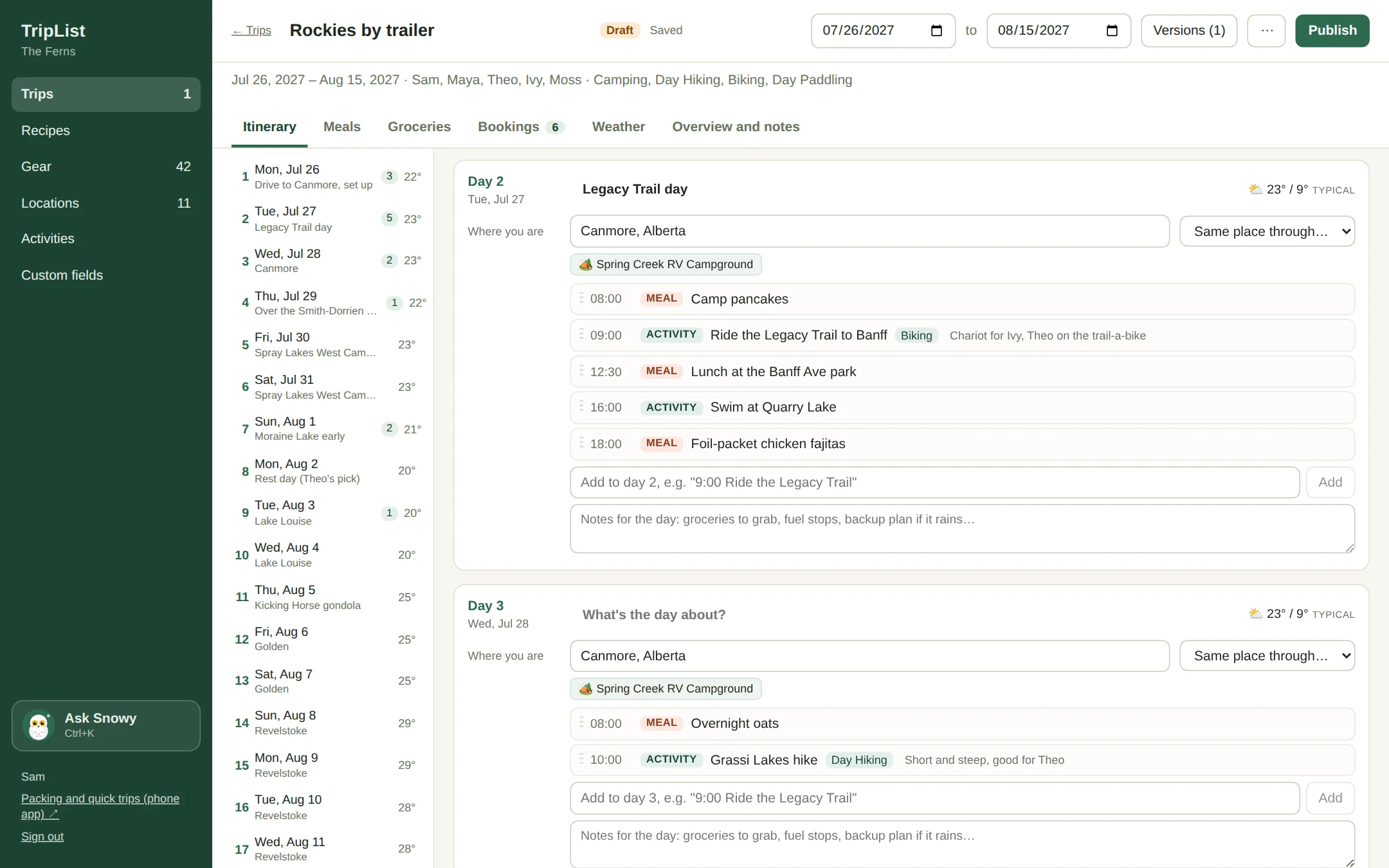
The TripList trip builder on a computer: a three week trailer trip, day by day, with weather and campsite bookings
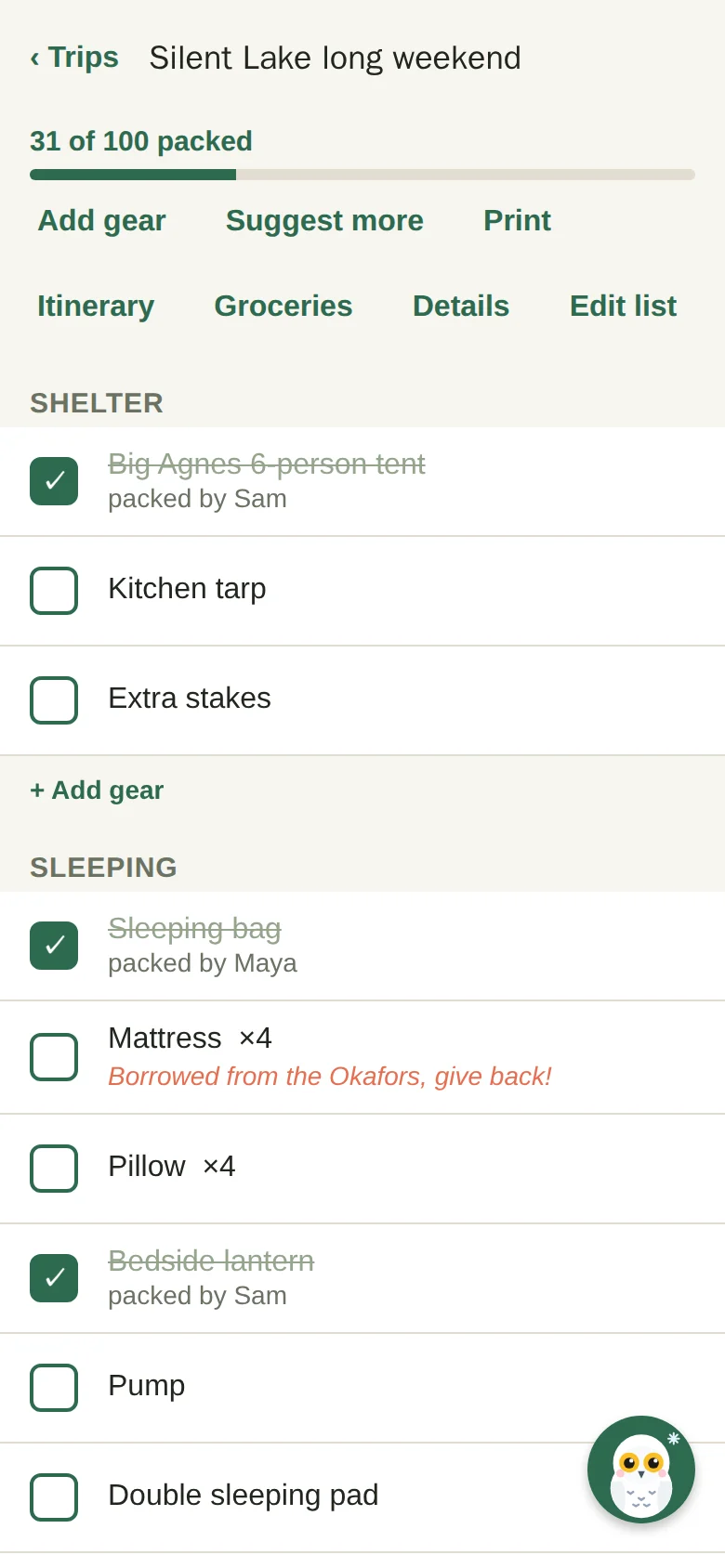
A TripList packing list on a phone, with items packed by Sam and Maya

Made for camping, day hikes, paddling, backpacking, biking, mountain biking, cross-country and downhill skiing, bikepacking, paddle trips and beach days. And whatever your family's version of outside is.

Why TripList exists

It started with a lot of lists.

After our first was born, my husband and I made a promise to keep doing the things we loved before. Camping, hiking, biking, cross-country skiing. We'd gotten pretty good at packing for all of it.

Then a small new person started coming along, and with them a whole pile of new stuff to remember. The pile kept changing too, because kids don't stay one size for very long. More than once we pulled into the trailhead or the campsite and realized something important was still sitting at home. Usually the one thing you really cant improvise.

So I started writing packing lists. Then I noticed I was writing the same lists over and over, with little changes, for the same handful of trips we do all the time. What I wanted was a base list for each activity that I make once, tweak for each trip, and tick off fast.

I figured I couldn't be the only parent making lists upon lists just to get out the door. TripList is for families like ours, the ones who'd rather spend the weekend outside than arguing in the woods about who was supposed to pack the kid-sized lifejackets and the extra fruit pouches.

Lucy
Co-founder, and the one with the lists
Packing lists

Lists that build themselves.

Pick what you're doing and who's coming. TripList starts from your list for each activity and each person (yes, the dog has one), merges them into one list sorted by category, and drops the duplicates. Camping and paddling on the same weekend? It does both at once.

  • Starter lists for eleven activities, tested on real families. Make them yours.
  • Your own gear shows up by itself. Theo's skis when Theo's coming, the Chariot when the baby is.
  • "One each" things count everyone going, so four people means four sleeping bags. Not five, the dog brings her own bed.
  • Pack a bin and everything inside it comes too.
Packing list on a phone, grouped by category, with who packed each item

Packing together

Two phones, one list, no shouting from the garage.

Everyone packs from their own phone. Tick the tent off in the garage and it's ticked on your partner's phone in the kitchen a second later, with your name on it. Add a note to anything, like "borrowed from the Okafors, give back." No signal at the trailhead? It keeps working and catches up when you're back in range.

  • See who packed what, live.
  • Add something you forgot right from the list, with suggestions for what families usually forget.
  • Print it if you're a paper and pencil person. We don't judge.
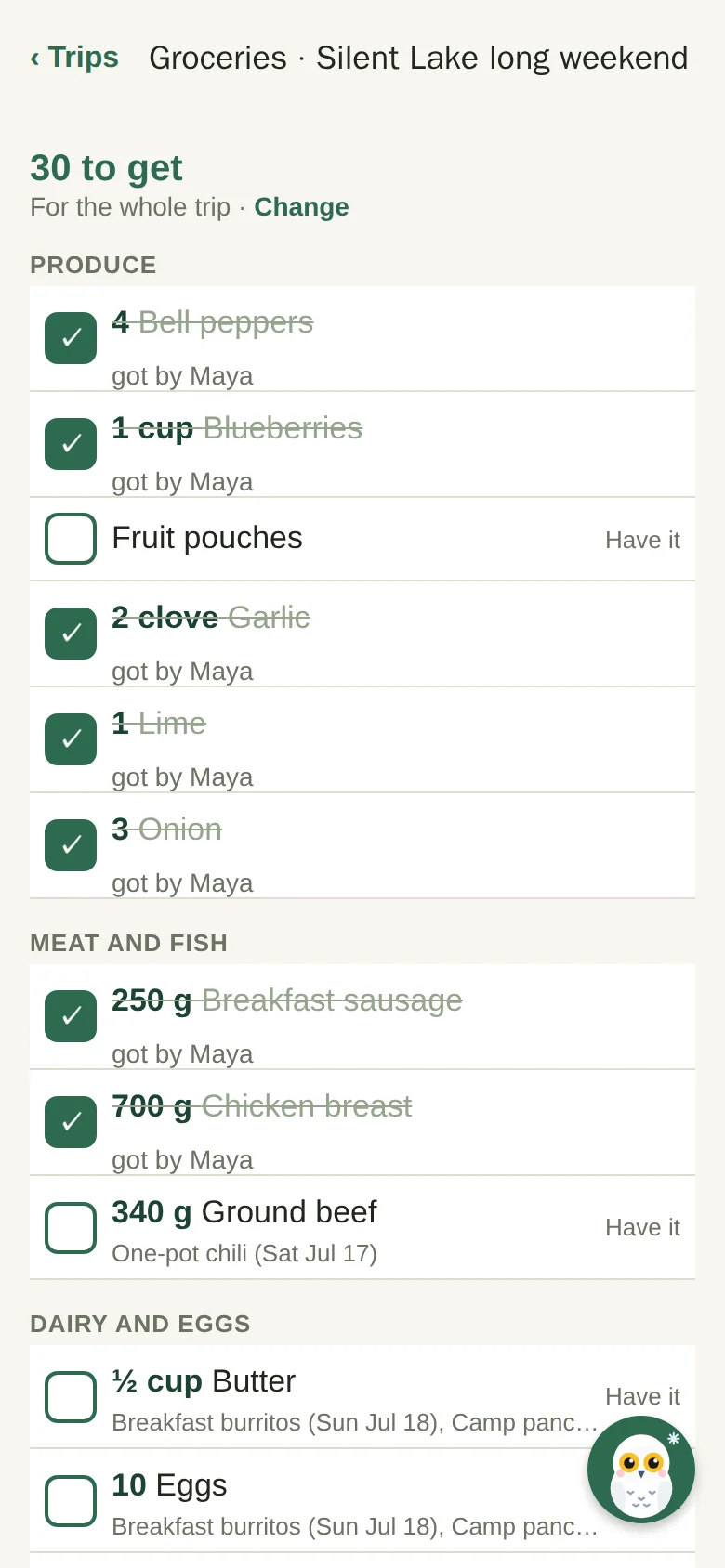
A shared grocery list on a phone with items ticked off by Maya

The gear garage

Every piece of gear, and exactly where it lives.

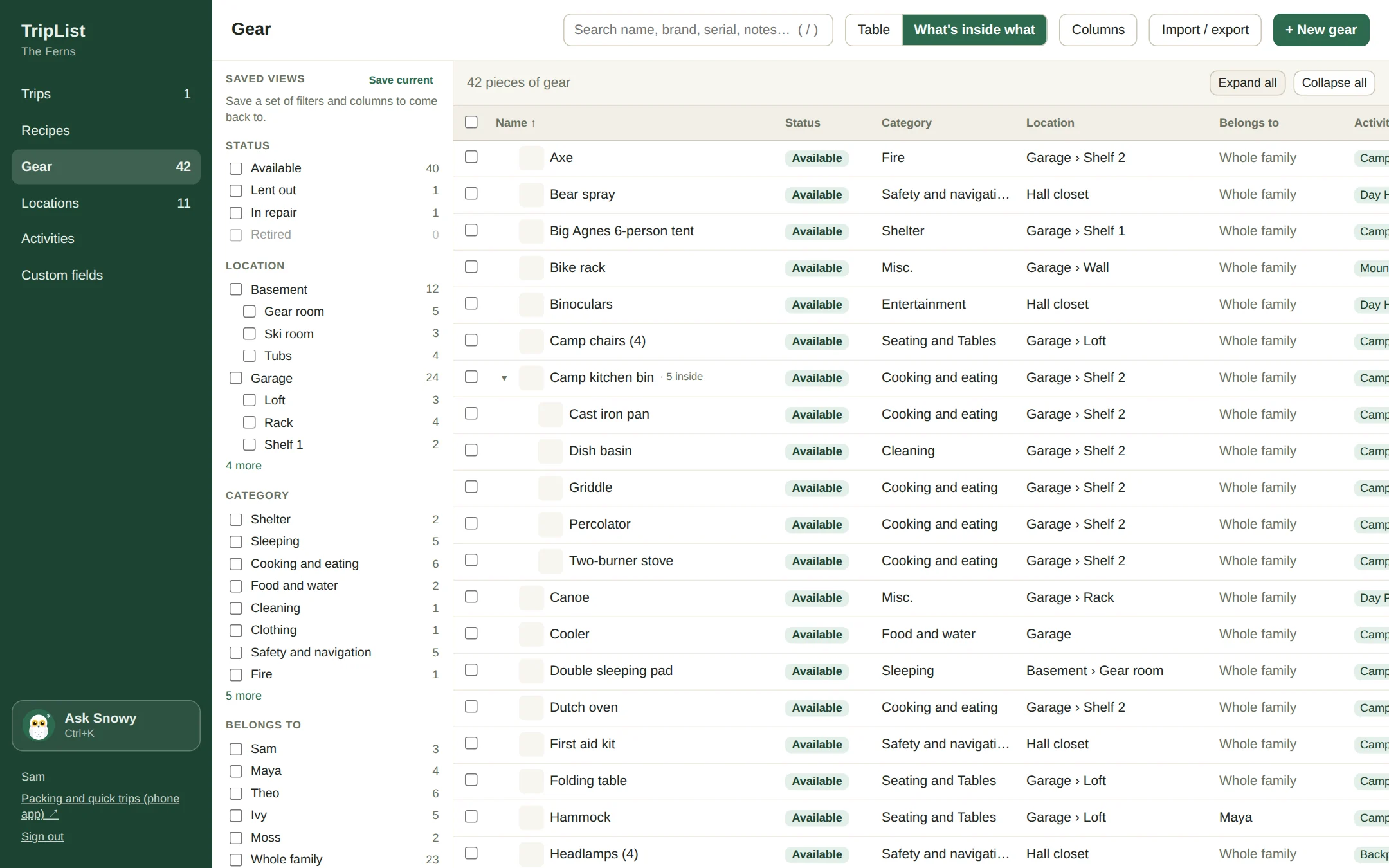
What you own, where it's kept (Garage, Shelf 2, the blue bin), who it belongs to and what it's for. Bins inside the trailer inside the garage. Lent to your sister, in for repairs, or retired for good. On your phone for a quick look, and on your computer when it's time to sort out the whole basement.

The TripList gear garage on a computer: filters by location, category and owner, with bins showing what's inside them

Find anything

Filter by place, owner, activity, status or your own fields, then save the view for next time.

Change alot at once

Pick twenty things and move them to the trailer, tag them for skiing, or mark them lent out.

Smart fill

Start typing "Theo's ski goggles" and it fills in the category, the shelf and the owner from the gear you already have.

The trip builder

Plan the big one like the project it is.

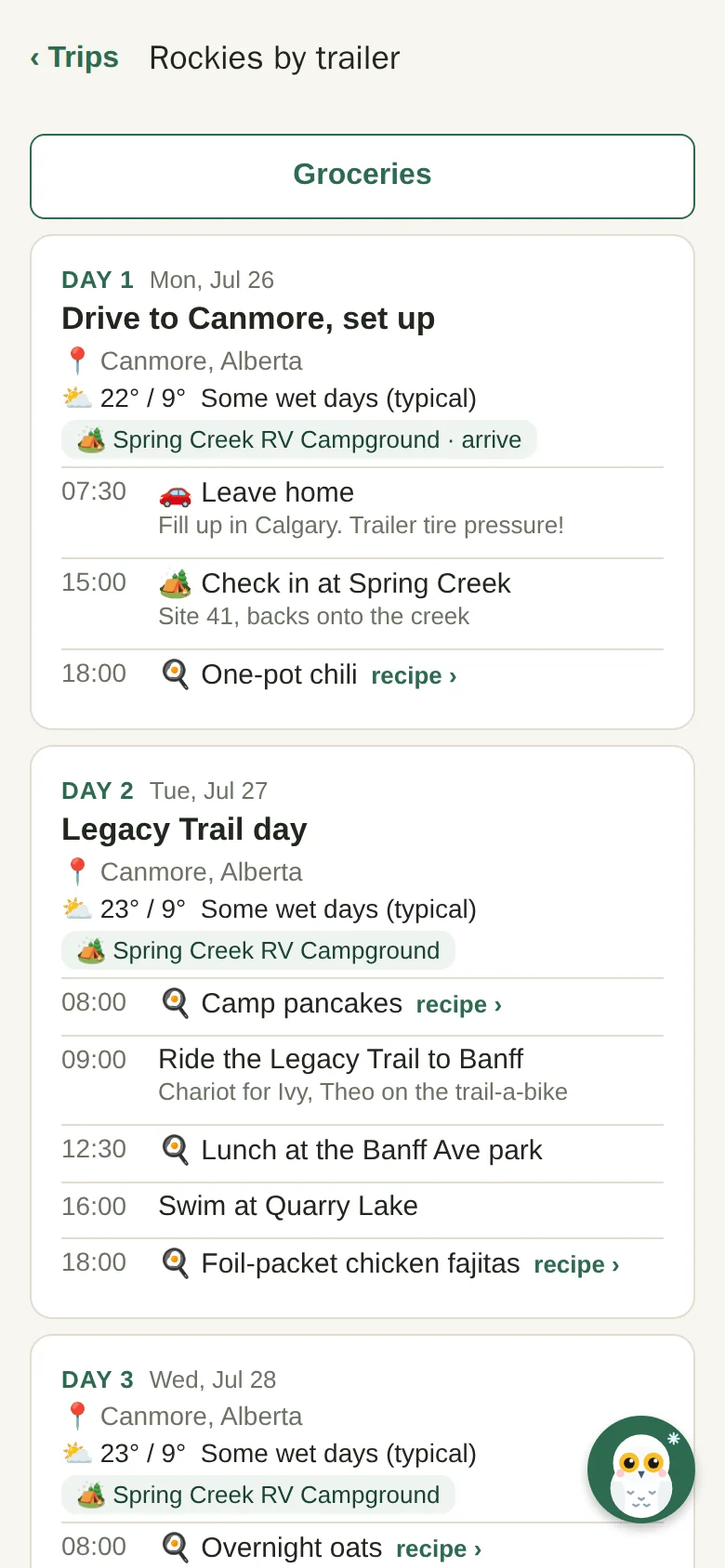
The three week trailer trip with biking, hiking and a lake every other day gets its own planner on your computer. A day for every date, where you're sleeping, what you're doing, and the bookings that hold it all together. Drag things between days, save a version before you try the coast route instead, and publish it to everyone's phone when it's ready.

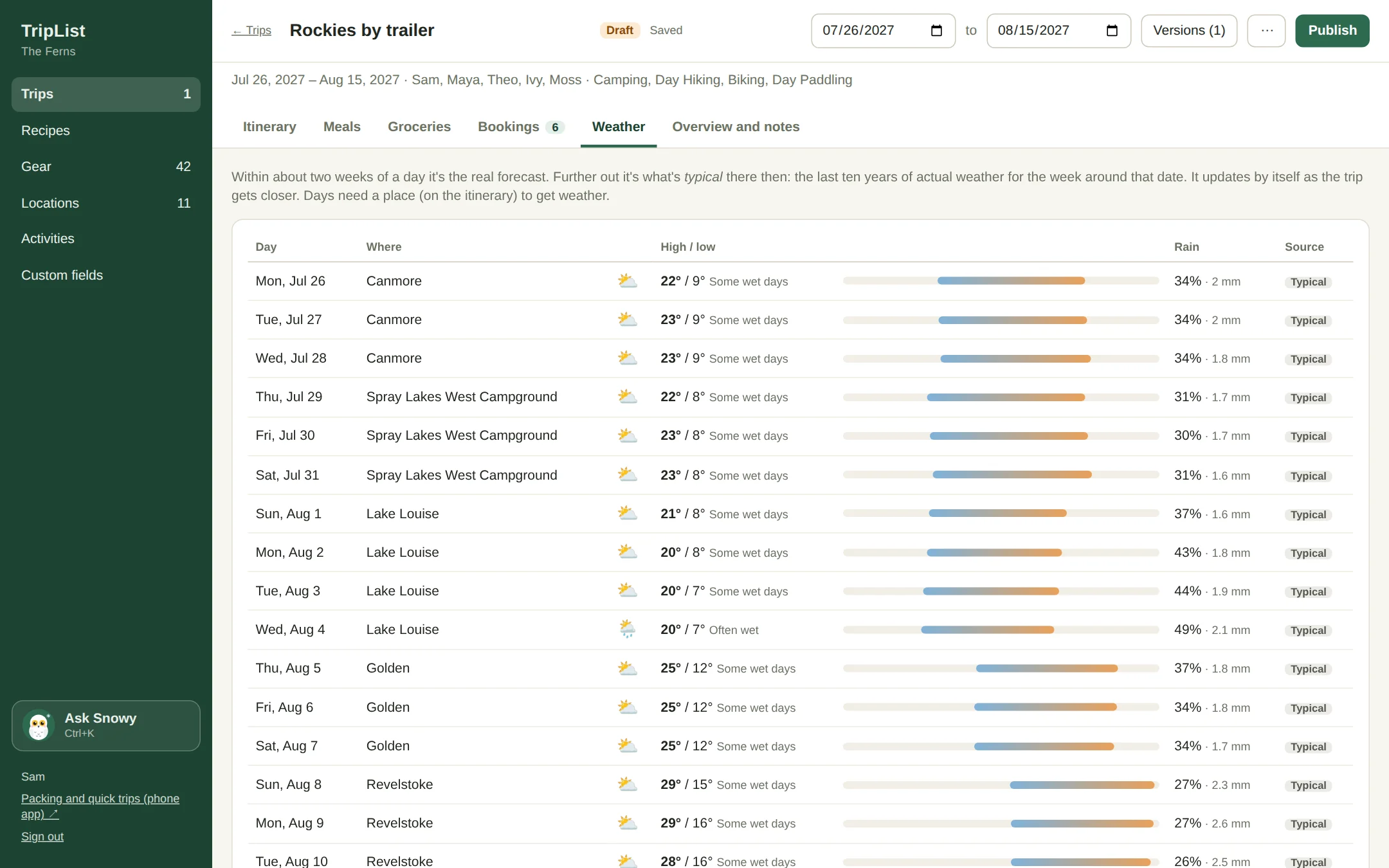
Weather for each day of a trip, typical weather from the last ten years where the trip is still months away
The day by day itinerary on a phone, with weather, campsites and meals

Weather, even months out

The real forecast once you're within two weeks. Before that, what the weather is usually like there that week, from ten years of records.

Bookings in one spot

Campsites, ferries, rentals and permits, with what's booked, what's paid and what's still to book.

Drafts and versions

Work on it for weeks. The family sees it on their phones whenever you want, and the packing list goes live when you publish.

The trip map

The whole trip, from your driveway and back.

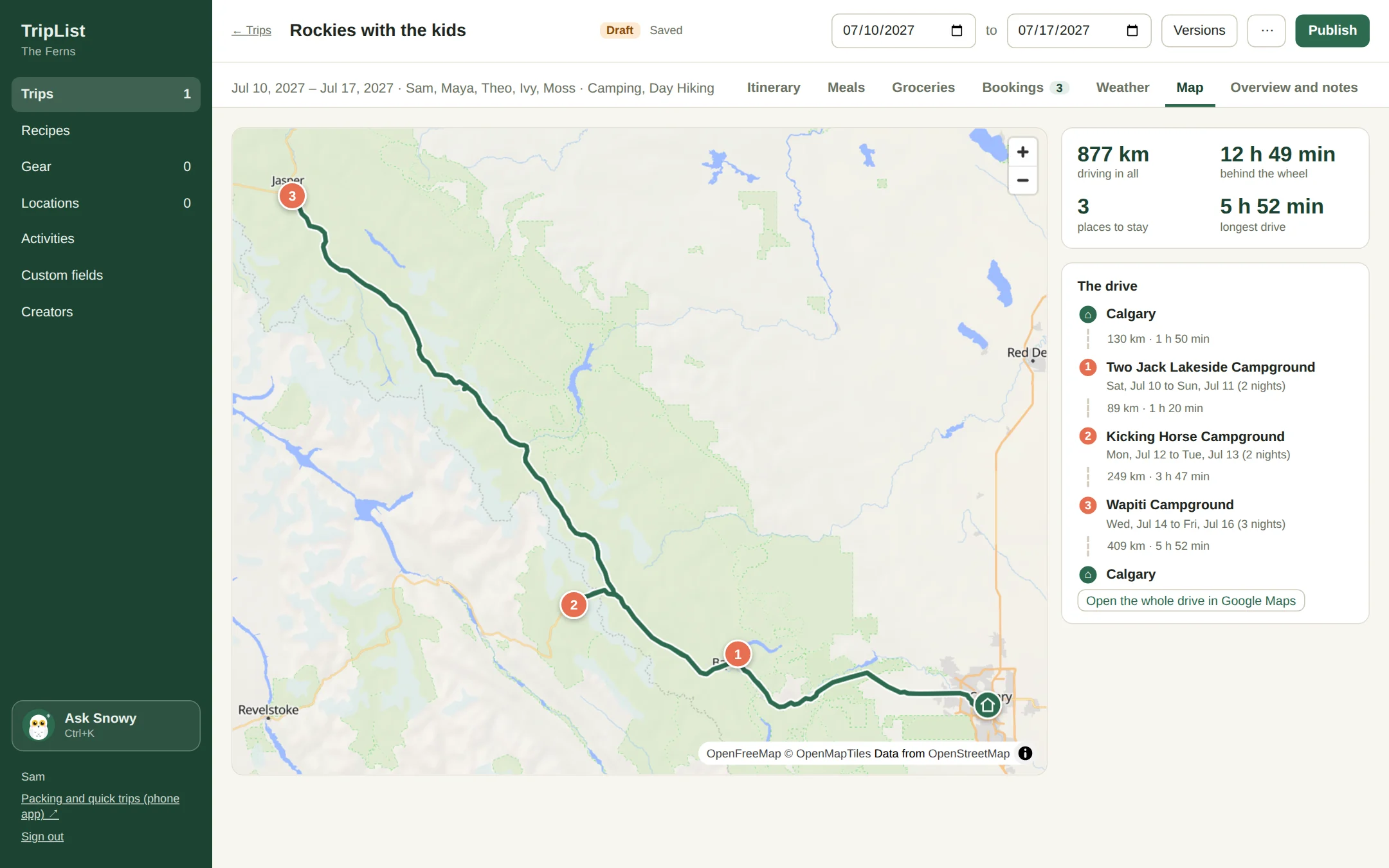
Set where you're sleeping each night and the trip draws itself on a map: home, every campground, and the road in between. How far, how long behind the wheel, and which day is the long one. Nobody needs another navigation app, it's just really satisfying to see the whole summer in one picture.

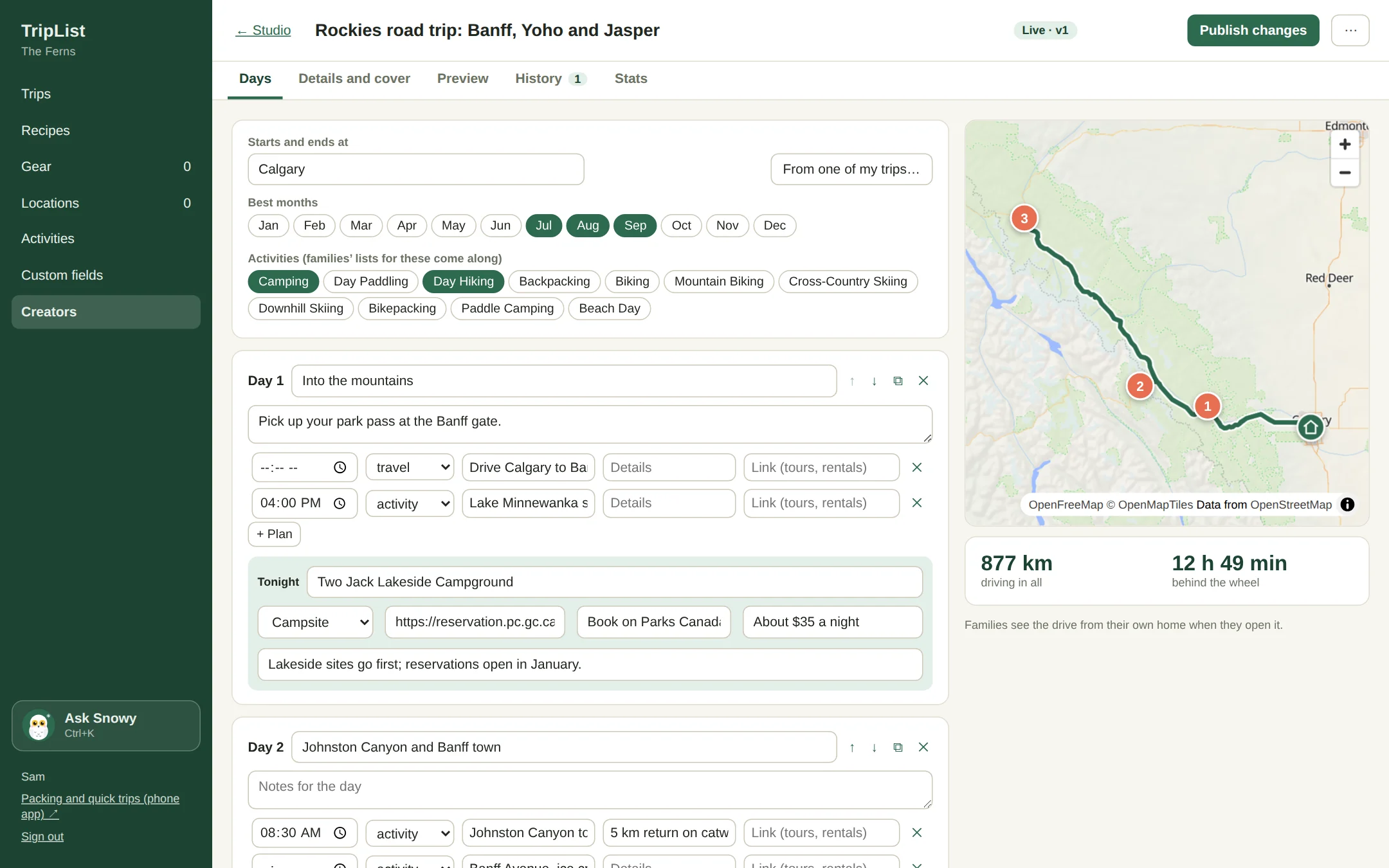
A week in the Rockies on a map: Calgary to Banff, Yoho and Jasper and back, 877 km and 12 hours 49 minutes of driving

Distance and drive time

Every leg, the total and the longest day, so you know which morning needs an early start.

Tap a pin for the address

Each night's campground opens in Google Maps. One more tap and the whole drive does too.

Searches that know where you are

Looking for "Lake Louise" on a Rockies trip finds the one in Alberta first, not Quebec.

Meals and groceries

Pancakes on Saturday means pancake mix on the list.

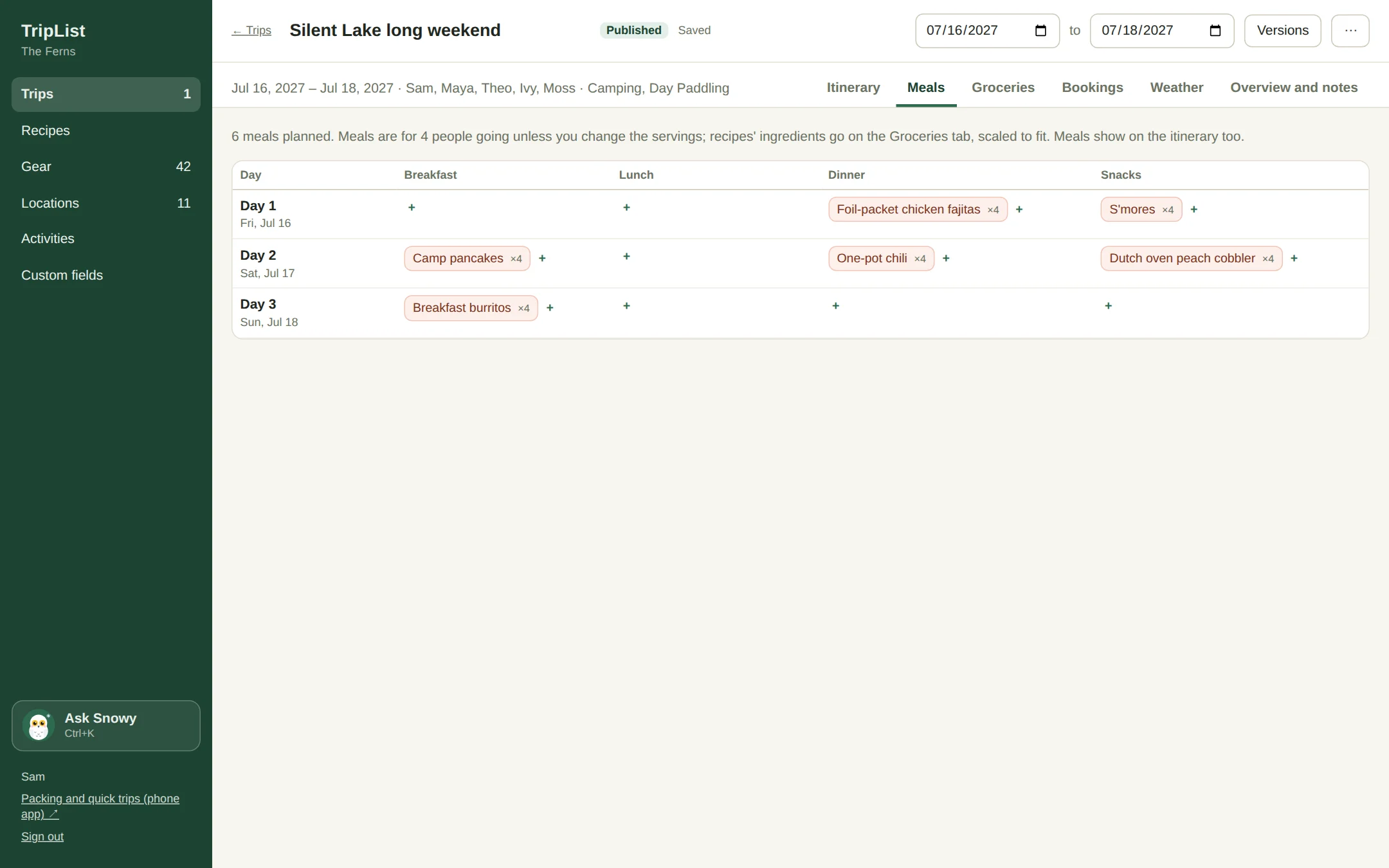
Keep your camp recipes in one place (or paste one in and let Snowy tidy it up). Put meals on the trip, and TripList writes the grocery list for you: scaled for who's eating, added up across every meal, sorted by aisle, and rounded to amounts you can actually buy. Nobody needs ¾ of an avocado.

  • Shopping twice on a long trip? Pick which days this shop is for.
  • Tick things off together in the store, and mark what's already in the pantry.
  • The griddle the pancakes need goes on the packing list too.
A meal plan for a camping weekend: breakfast, lunch, dinner and snacks for each day

Community

Borrow the list from someone who already forgot the can opener.

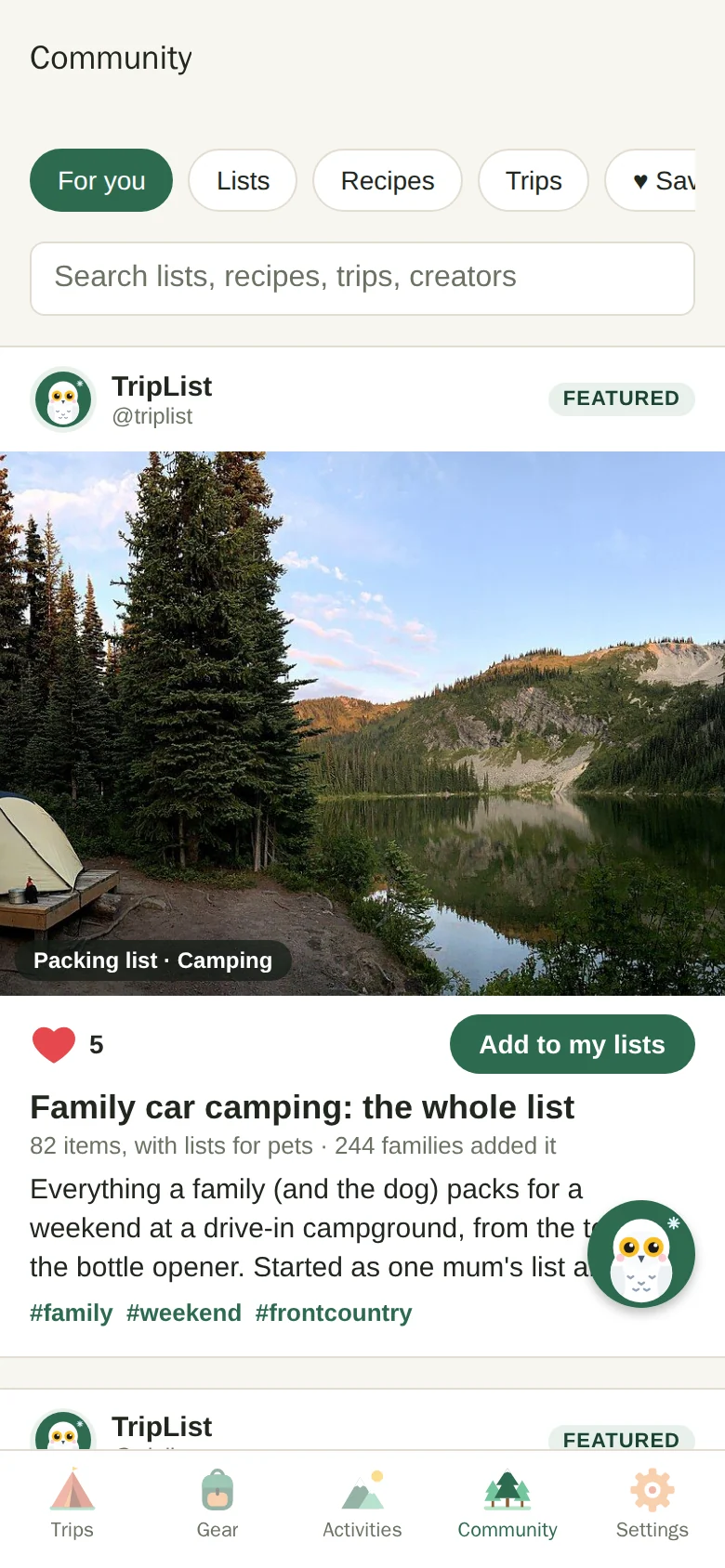
Scroll a feed of packing lists, camp recipes and whole trip plans from TripList and from outdoor families and creators we trust. See one you like? Add it in a tap and it joins your own lists, so every trip packs it from then on. Already have a camping list? It only adds what yours is missing.

  • Starter lists for every activity, so you're never starting from a blank page.
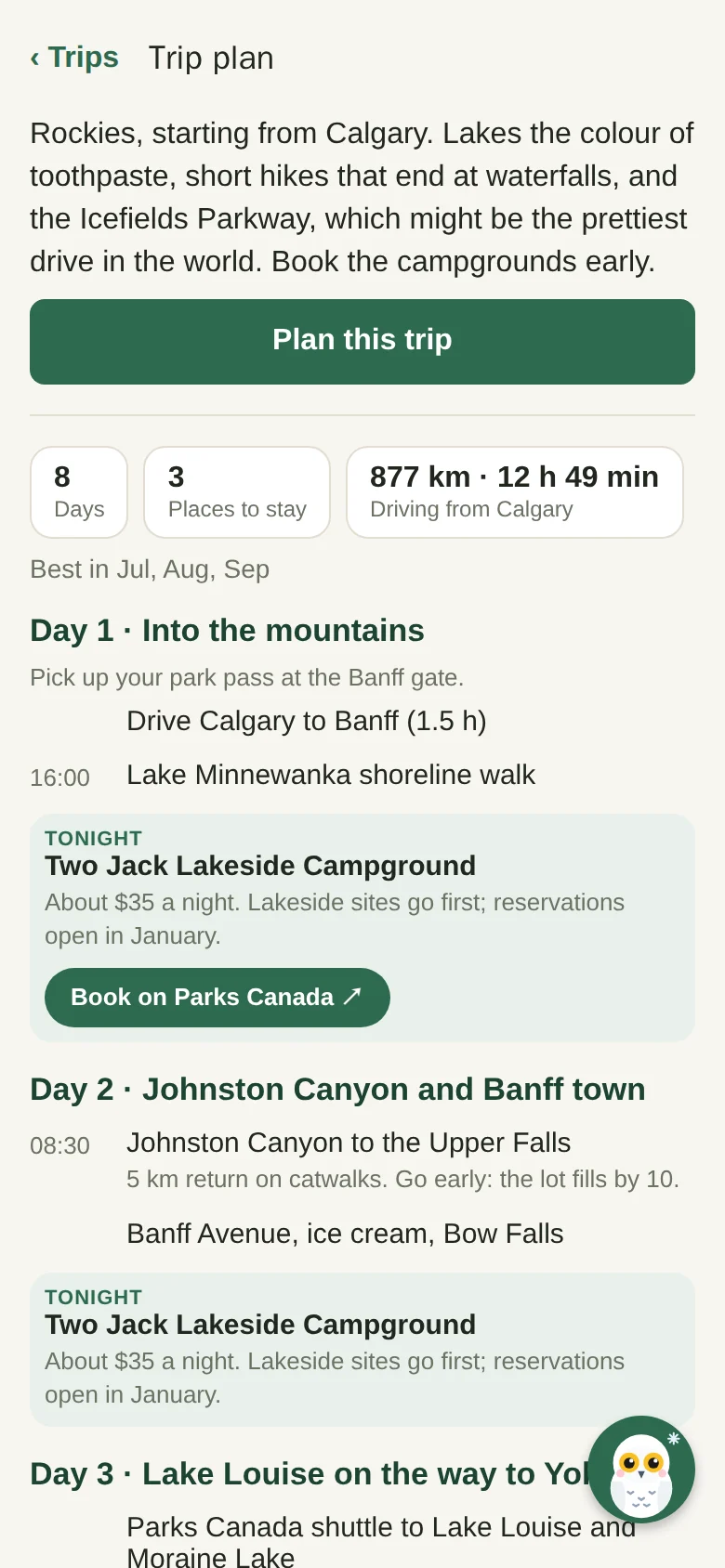
  • Plan a whole trip from someone else's: every day, every campground and the bookings to make, ready to change.
  • Recipes go straight into your recipe book, and onto the grocery list when you plan them.
  • Heart things for later. When a list you use gets better, you hear what changed.
The Community feed on a phone: a family car camping list with a photo, ready to add
A Rockies trip plan on a phone, day by day, with each night's campground and a button to book it

Meet Snowy

An owl that knows where the headlamps are.

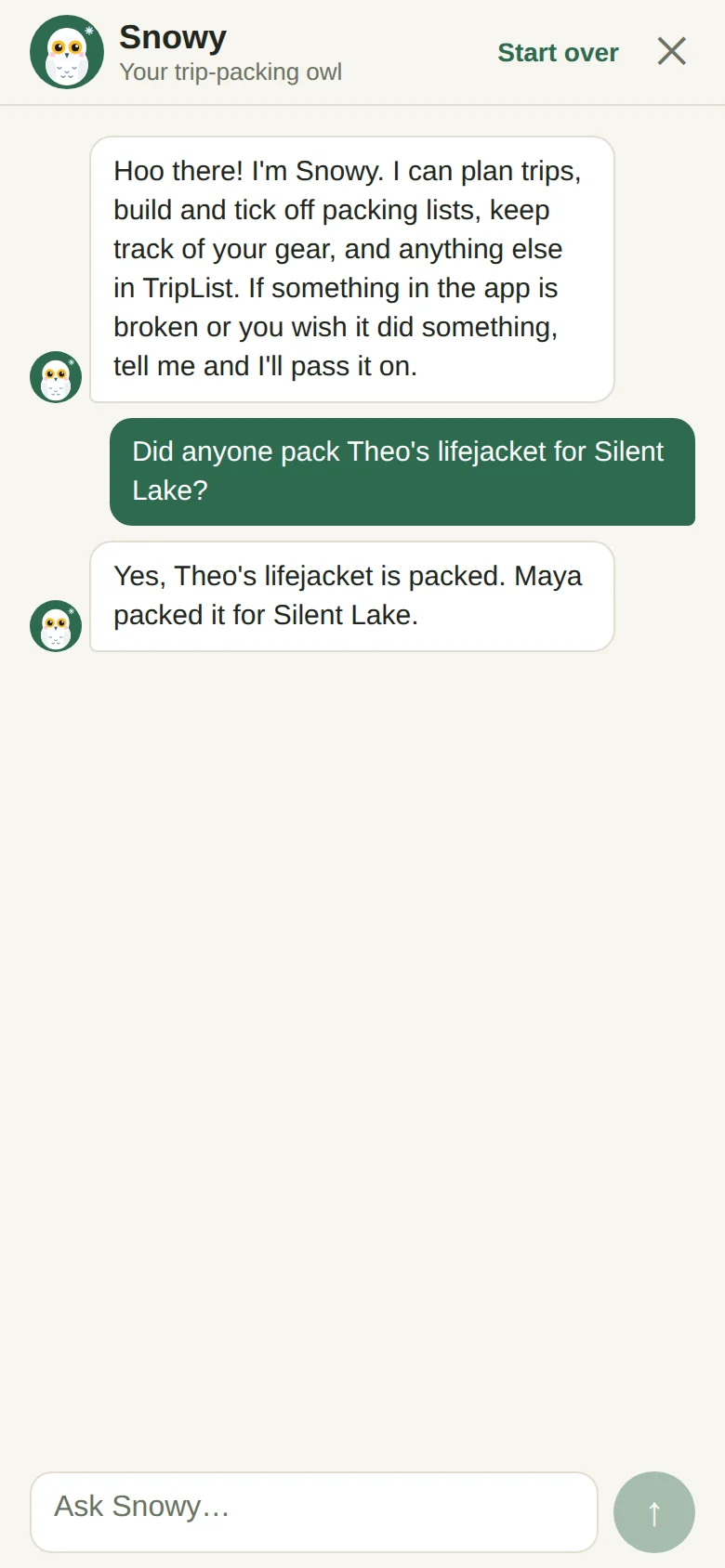
Snowy lives in the app and can do anything you can, just by asking in plain words. "Did anyone pack Theo's lifejacket?" "Move everything in the kids bin to the basement." "Pancakes every morning, chili on Saturday." Snowy checks with you before deleting anything.

Snowy is a snowy owl. We did think about other names. Not for long.

Asking Snowy whether anyone packed Theo's lifejacket, and Snowy answering that Maya packed it

How it works

  1. 1

    Tell it about your crew

    Add the people (and pets) you pack for, and your gear. Snowy can help, or import a spreadsheet.

  2. 2

    Make a trip

    Pick the activities, the dates and who's going. A quick day out takes about ten seconds.

  3. 3

    Pack together, get outside

    Everyone ticks things off from their own phone. Then you go have the fun part.

Questions people ask

When do I get in?

We're opening TripList to families in waves. Join the waitlist and we'll email you when your spot is ready.

What does it cost?

Nothing while we're in beta.

Does it work on my phone?

Yes. TripList runs on iPhone and Android right in the browser, so there's nothing to install. The trip builder and the gear garage are made for your computer, where the big planning happens.

What if there's no signal where we're going?

Your packing lists, itineraries and recipes stay on your phone. Tick things off anyway and it all syncs up once you're back in range.

Can the whole family use it?

That's kind of the point. Invite your partner, the grandparents or your camping friends with a link. Everyone gets their own login and you all share one family.

Can we use other families' lists?

Yes, that's what Community is for. Add a list, a recipe or a whole trip plan from TripList or one of our creators and it's yours to change. Some of the best packing advice comes from someone who already forgot it once.

Is our family's info private?

Your lists, gear and trips are only seen by the people you invite. We don't sell your data.

Your next trip, already packed.

The beta waitlist is open. Tell us a bit about your crew and we'll let you know when you're in.

Who do you get outside with?

The creator program is open

Your packing list, in their trip.

Families already trust your advice about getting outside. TripList puts your packing lists, camp recipes and trip plans right where they pack, cook and plan: one tap from their own trips, with your product and booking links along for the ride.

Free to join. We're bringing creators in a few at a time.

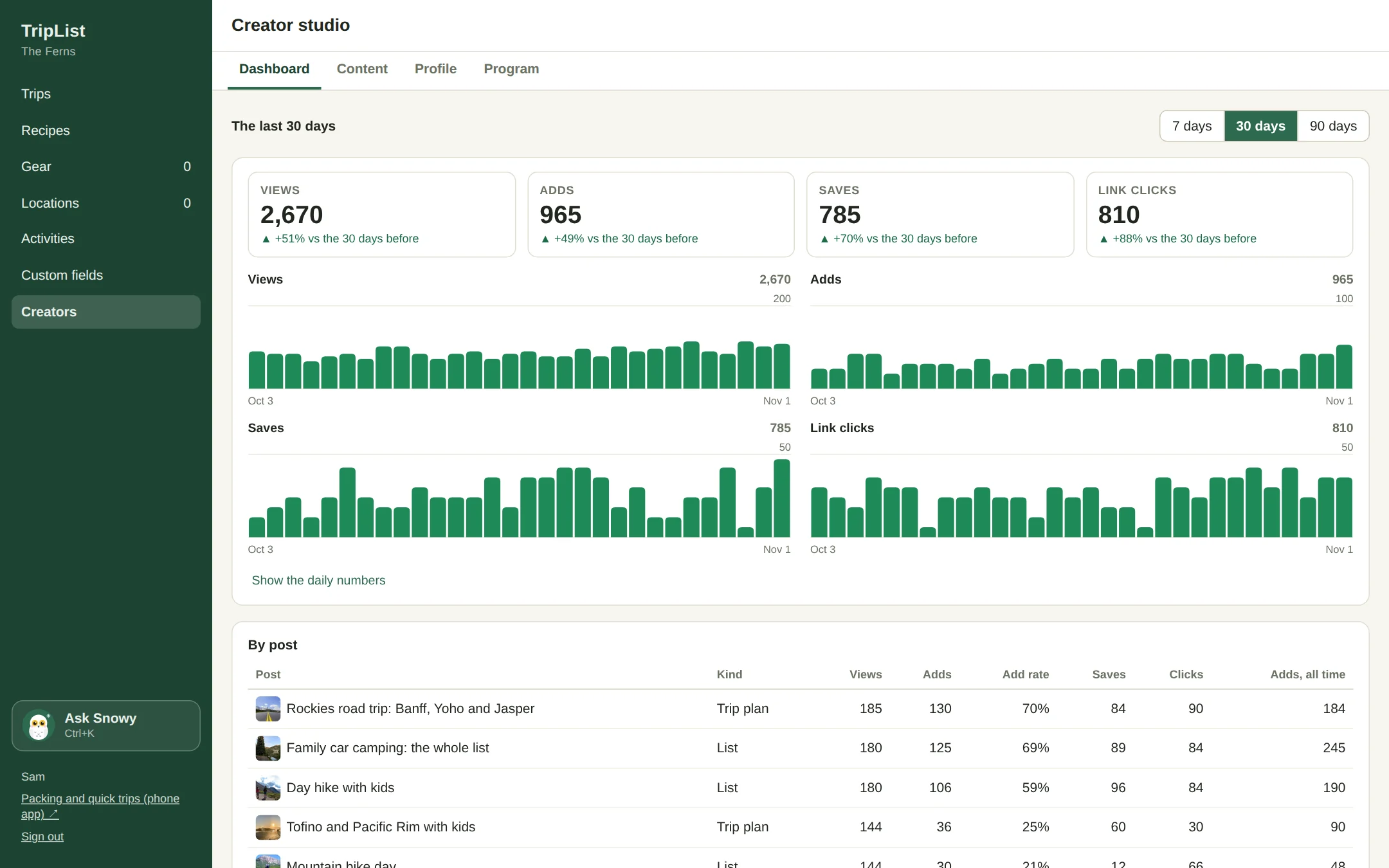
The TripList creator studio: views, adds, saves and link clicks for the last 30 days, by day and by post
A creator's packing list in the Community feed on a family's phone

For outdoor bloggers and YouTubers, guides, gear shops and outfitters, campgrounds and parks, and the friend everyone texts before a trip.

Packing lists

Not a blog post they screenshot. A list they pack from.

Your list shows up in the Community feed with your photo, your name and your tips. When a family adds it, it becomes part of their own lists for that activity, so every camping trip they plan from then on packs from your list. That's a very different thing from a pin they'll never open again.

  • Lists for the whole family, each adult, each kid, the baby and the dog, the way families actually pack.
  • A product link on any item. Families tap it right when they're figuring out what to buy.
  • Notes on items, like "bring steel stakes, campground pads are hard", where people read them.
A packing list in the Community feed, with how many families added it

Trip plans

Trip plans people actually book.

Lay out the trip you know by heart: where to sleep each night, what to do each day, the hike to do early before the lot fills. TripList draws the route and works out the driving. Put your booking link on each night. When a family taps Plan this trip, it becomes their own trip with every day in it, and your campgrounds land on their list of things to book.

Making a trip plan in the creator studio: each day's plans and where to stay, with the route on a map
The trip plan on a family's phone, with a Book on Parks Canada button for the first night

A booking link every night

Your affiliate link, the park's reservation site, or the lodge you love. You see every click.

The drive, worked out

Distance and hours behind the wheel, from your start, or from each family's own front door.

It becomes their trip

Days, places, plans and bookings to make, ready for them to change and pack for.

The creator studio

A real studio, not a comment box.

Make and keep up your lists, recipes and trip plans on your computer. Everything saves to a draft as you type, and families only see it when you publish. Change your mind about the bug spray? Publish a new version with a note, and everyone who added it hears what's new.

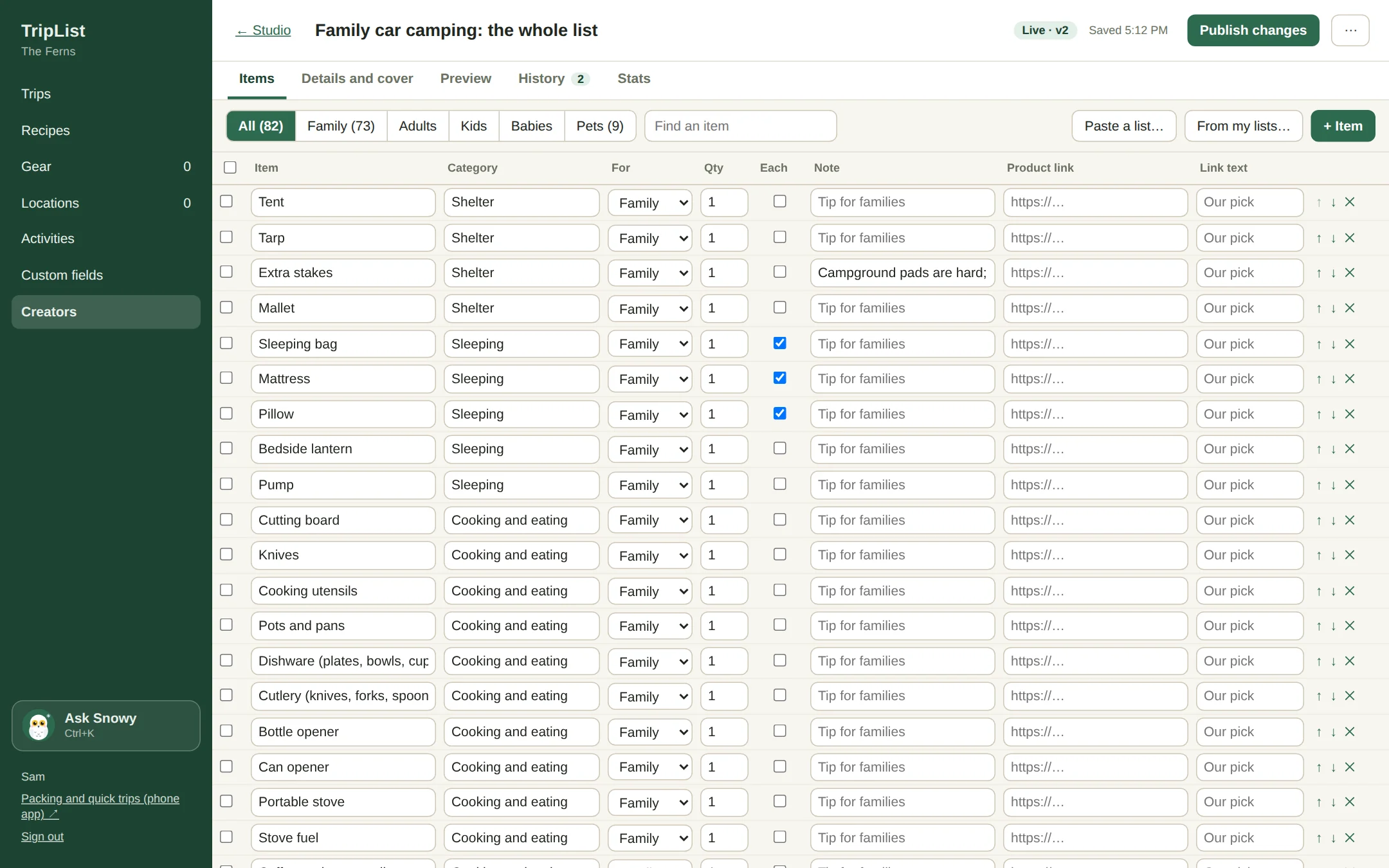
Editing a packing list in the creator studio: items with categories, who they're for, quantities, notes and product links

Start from what you have

Paste a list from your notes, or bring in your own family's lists, recipes and trips from TripList.

Versions with notes

Every publish is a version you can look back at, compare, and put back if you need to.

See it like they do

Preview exactly how it looks in the feed before it goes out, cover photo and all.

Stats

Know what's working.

Views, adds, saves and link clicks for the last week, month or three, by day and by post. The add rate tells you which lists families actually keep, and the links table shows which products and campgrounds they click on. It helps alot when you're deciding what to make next.

  • An add means a family made your list part of their trips, not just a like.
  • Every product and booking link counted, per post.
  • Compared to the period before, so you can see a good month coming.
Creator stats: daily views, adds, saves and link clicks, and a table of posts with their add rate

How it works

  1. 1

    Ask to join

    Tell us who you are and what you'd make. We open studios a few creators at a time.

  2. 2

    Build it in the studio

    Lists, recipes and trip plans, with your photos, tips and links. Start from things you already have.

  3. 3

    Publish, then watch it get packed

    It goes into every family's feed. Share the link with your people too, and see the adds come in.

Questions creators ask

Who can join?

Anyone who makes good stuff for families getting outside: writers, video makers, guides, shops, outfitters, campgrounds and parks. We look at what you'd make and who it's for.

What does it cost?

Nothing. The creator program is free.

Can I use affiliate links?

Yes, on list items and on each night of a trip plan. Families see a short note that creators may earn a commission from their links, and you see how often each one gets clicked.

Is my content still mine?

Yes. You can change it, take it out of the feed or delete it any time. Families who already added it keep their copy, the same way they'd keep a list a friend sent them.

Can I update a list after people add it?

Yes. Publish a new version with a note about what changed. Families who added it get your note and can bring the new items into their own list in one tap.

What do families see about me?

Your creator page: your photo, name, handle, a line about you, your link, and everything you've published.

Put your best list in someone's trunk.

Tell us a bit about you and we'll get your studio set up.